Miscellaneous
|
Purpose: |
When on, any problems that occur while processing database commands will be displayed to the user in the form of error messages. When off no messages are displayed. When this feature is turned off, you can obtain the most recent error is by examining the global [dbpError] variable. ShowErrors is set to on automatically when NeoDBpro is initialized. |
|
Category: |
Miscellaneous |
|
Syntax: |
dbpShowErrors "status" status The status of the ShowErrors feature. Use "Yes" to turn ShowErrors on or "No" to turn it off. |
|
Example: |
When ShowErrors is turned off you can check the global [dbpError] variable to detect important errors and respond if needed. For example: dbpShowErrors "No" dbpFind "AddrBook" "Contacts" "LastName;FirstName" "[SearchStr]" "ExactMatch=No;CaseSensitive=No" If "[dbpError]" ">" "" AlertBox "Sorry" "No matching records found." EndIf dbpShowErrors "Yes" |
|
SQL Equivalent: |
N/A |
Note: In addition to the normal error trapping provided by the [dbpError] variable, you can also create an error subroutine called DBPro_OnError to execute special actions whenever a database error occurs. For example, the following subroutine beeps annoyingly whenever a database error is detected:
:DBPro_OnError
PlayTone "440"
Return
You should avoid executing database actions from within this subroutine if possible! Doing so could cause your publication to become stuck in an endless loop.
|
Purpose: |
Customize or translate the hints used by the grid navigation buttons and other NeoDBpro features. These settings affects all tables and grids, even those that have not yet been opened. The grid navigation bar is displayed using the ShowNavigationBar property of the dbpSetGridProperties action. |
||||||||||||||||||||||||
|
Category: |
Miscellaneous |
||||||||||||||||||||||||
|
Syntax: |
dbpTranslateHints "hints" hints This is a compound parameter and can contain any combination of the following items:
Separate multiple items in a compound variable with semicolons (;). Items that do not need to be translated can be omitted. |
||||||||||||||||||||||||
|
Example: |
The following example will translate the hints into Italian: dbpTranslateHints "First=Primo;Previous=Precedente;Next=Successivo; Last=Ultimo;Add=Aggiungi;Delete=Elimina;Edit=Modifica;Save=Salva Modifiche;Cancel=Annulla Modifica;Refresh=Rinfreschi;DeletePrompt=Annotazione di cancellazione?;DeleteTitle=Confermi" You can disable the delete confirmation dialog, by setting the DeletePrompt and DeleteTitle properties to empty strings. For example: dbpTranslateHints "DeletePrompt=;DeleteTitle=" |
||||||||||||||||||||||||
|
SQL Equivalent: |
N/A |
|
Purpose: |
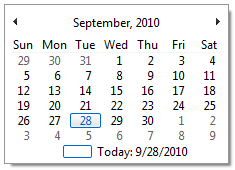
Display a popup calendar and allow the user to select a date. The selected date is stored in a variable. The appearance of the calendar is determined by the current Windows theme. |
||||||||
|
Category: |
Miscellaneous |
||||||||
|
Syntax: |
dbpPopupDateSelector "properties" properties This is a compound parameter and can contain any combination of the following items:
Separate multiple items in a compound variable with semicolons (;). variable The name of the variable to store the selected date. |
||||||||
|
Example: |
dbpPopupDateSelector "Left=57;Top=301;InitialDate=;DateFormat=m/d/yyyy" "[Result]"
|
||||||||
|
SQL Equivalent: |
N/A |